Showing posts with label classroom. Show all posts

Tuesday, June 30, 2026

Morning Slides - On This Day in History

My experience in many schools is that social studies instruction often gets put on the back burner. We are told to integrate it into other subjects, but depending on your curriculum that is easier said than done. So a few years ago I started creating these morning slides that give students a little piece of history each day, plus a vocabulary word that goes along with it because vocabulary is another area that students seem to really struggle.

Each day the slide is set up so that you get a fact about something that happened on that particular day in history. There is a vocabulary word with the definition that goes along with the historical fact. In the speaker notes at the bottom is a link to more information about the fact. So depending on how much time you have it can be a quick 5 minute mini-lesson on something from history.

The best part is that these slides are completely customizable. Want a different fact from on this day? Change it out! Don't like the vocabulary word that goes with that day? Pick a different one! Use the checklist to get your students set up for the day and just leave this on the board for students to read as they come into the classroom.

Below are a few examples and then if you want to check out each month, just click on this link!


Monday, January 19, 2026

January Reset

Things that I did in my classroom the week after winter break...

Sprinkled in a few New Year's Activities:

- One Word

Students create a Google Slide with a word that describes their year, goals, etc.


- New Year's Resolutions

Students think ahead to 2026 and the things they would like to accomplish.


- Vision Board

Students use Google Slides or Canva to create a vision board for the upcoming year.


- Winter Break Mood Check

I assigned this slide deck in Google Classroom for students to complete during the first week back. It gave them a safe place to let me know how their break was and how they are currently feeling about being back at school. You will be surprised what they will tell you!


Classroom Routine Reset:

Most things stayed the same, but I took this opportunity to change a few things for the second half of the school year and review the routines that were the most important to our classroom.

I also introduce a one rule classroom at this point in the year. It's simple and something that I can use to easily redirect as needed. Is what you are doing interrupting the learning of others? Then don't do it.


While I sprinkled in the activities above, we most importantly dove right back into learning. The middle of the year is 2 weeks away upon our return. That means mid-year testing will be quickly approaching and it is time to get their brains back on track. Kids also thrive off of routine, so establishing the schedule on day 1 is important.

Lastly, have some grace. Remember that the break was different for everyone. Some students may be excited to get back to school so that they have hot meals for breakfast and lunch. Some may be excited to see friends that they haven't seen in 2 weeks. Some may be tired because they were off their usual schedule (teachers included!). Some would rather be at home with their families. All of these things are completely acceptable. When jumping back into the schedule and routines, it is important to understand that some students may need some time to adjust and a few extra reminders.

Hope the rest of your school year goes well!


Sunday, September 8, 2024

Classroom Library Organization

This year I decided to redo my classroom library organization. Books are organized by genre or by series, so I created genre posters to help kids learn about the different types of books. New organization means new resources to share!


Book Buddy

My classroom library has been my pride and joy since I first started teaching. Facebook Marketplace, yard sales, and McKay's Used Book store are great places to look to get used books. If you work in a title 1 school you can also sign up for First Book Marketplace to get new books for really great prices.

I can be a little Type A, so I also use an app called Book Buddy to keep track of my books. You can easily add books to the inventory by scanning the barcode on the back of the book or doing a search online. You can set it up to have students check out books from your classroom library, but I use it more often to see if I have a book that a student wants to read. Unfortunately, the app is only available on Apple products and it does cost a one-time fee of $4.99, but compared to the free versions it was worth it in my opinion.

Book Bin Labels

I created the book bin labels to match the genre posters below. I like to organize my classroom library by genre or content area. The chapter books will each have a bin for the genre, unless I have enough of a book series to create their own bin. The picture books are organized by content area (ie. math, social studies). Click the link above to download your own copy of the labels.

Genre Posters

I created these posters as a fun way to learn about the different genres. I wanted them to look like movie posters and Canva made that possible! Click the link above to download your own copy of the posters.


Sunday, September 1, 2024

Back to School Math Activities

Here are some math activities to do the first week of school that allow students to get to know each other by working together and you to get to know your students through observation and conferring.

Set up your math classroom community through teaching math norms. I use the math norms that we used when I taught in Maryland. They come from the SFUSD and can be found here.

image from SFUSD


Each day I do a different activity to help students practice that norm. Some of the activities include:
  • Use tangrams to complete different challenges (there are plenty online for all age levels for free!)
    • make sure to have a discussion afterwards about the challenges and how it feels when we make mistakes or when math gets frustrating and what students can do when this happens
    • this is also a time to discuss expectations for math tools

  • Introduce math/number talks to get students talking about each other's thinking (here are some examples to get started)
    • use this time to set up routines and expectations for math/number talks and discuss stems students can use to agree/disagree, add on, or explain
    • here is a resource of sentence stems students can put on their desk or math notebook

  • Use an activity from Building Thinking Classrooms to get students working together and show off their problem solving abilities
    • This is also a great time for the teacher to model the asking questions norm and have students practice asking questions as well

  • Give students a task that allows them to model using multiple representations. This will look different depending on the grade level and your curriculum as this is a great time to kick off your first unit with some review
    • At my current school where I teach 4th grade, we have students use 36 tiles and ask them to design rectangles that use all 36 tiles. Students can attempt to make a connection to multiplication and arrays from grade 3.
    • You could also give students a word problem and tell them that they can solve it using any strategy they would like and then have students share

  • The last thing I do during the first week of school to get to know my students is a math screener. I use this on the day I introduce that math norm that answers are important, but they are not the math.
    • I explain to students that if they don't show me their thinking using math then I can't help if they make an error.

  • I also use the first week of school to introduce math games. I choose a topic that students should already be familiar with so that we can focus on practicing the expectations for math games. This is a great time to again practice routines for getting materials and cleaning up


Monday, January 15, 2024

Post-Winter Break Reset

January is the time that many teachers do a reset. After students have been away for a week or two, it is always important to review the expectations of the classroom. 

However, I also use this time to reset my classroom space as well. We are almost halfway done with the school year and I have gotten to know my students better as learners. Honestly, I like to change my space around throughout the entire year, but this is the time that I reflect and think about what my learners truly need on the walls, what learning spaces they need, and what materials they need.

I rearranged my tables and desks to give students options for learning spaces. I have two exercise balls and I have stools that students can use if they want a break from their chairs. I also allow them to sit on the carpet whenever they would like. I am wanting to move towards flexible seating in the entire room, but due to the amount of money this involves, I am slowly working on getting the needed furniture for that.

I also redid my wall space. Being in a new grade level means that it takes time to create the resources that I typically use in my classroom. Things like anchor charts, vocabulary cards, etc. When you teach the same grade level for 9 years, you accumulate items that you can reuse over and over. Luckily, moving from 5th to 4th has allowed me to reuse some items.

One thing I have been working on is redoing my math vocabulary cards that I hang on the wall as we learn about a new topic. I finally decided to sit down and update my math vocabulary for the year. All of my vocabulary cards have the vocabulary word, a definition, an image, and sometimes an example.


Vocabulary Cards:


Connect with me on Twitter and Instagram!
@mrspotterteach


Wednesday, August 16, 2023

Back to School 2023!

Something about this school year just feels different. I am starting at yet another new school (see this blog post) and this year the idea of change is exciting.

I am going to be teaching 4th grade and wanted to share some of the things that I am creating to get started with this crazy time of year.

I've been using digital planners for a few years now and each year I always think of things to change/add. This year I started from scratch. I put some thought into the things that I truly would use and came up with this design. I usually use one slide per week, but opted to go for the 2 slide format. The slides are also already 8.5 by 11 inches, so if you need/want to print them off it is easy to do!

My favorite thing about using a digital planner is that I can easily link my lesson plans and materials directly to each day/subject in the planner. My second favorite thing is the ability to easily move things to a different day/week because we ALL know that things never go as planned, especially during the first few weeks of school.

Leave me a comment of things you would like to see in a digital planner so I can update this one!


Need a fun open house activity? How about the passport to 4th grade to organize the different information and activities you need your parents/students to do during open house!

This has an airport theme that allows for different "destinations" to visit based on the information you need to share. As students/parents enter the room, they will sign in and receive their passport. Destination #1 is all about transportation. Parents let me know how students typically arrive at school and go home from school and if it will be different on the first day. Each stop also has a sticker (or you can use stamps) that students will add to their passport to show that they have visited all of the destinations.


Part of the open house stops that I mentioned above include a meet the teacher newsletter that I give to parents with a little bit about me as well as my contact information. I created this design in Canva and then saved it as a jpeg. Then I used Google Slides. I changed the page size to 8.5 x 11 inches, and made the jpeg my background on the slide. Insert text boxes where you want then print!


When I was departmentalized a few years back I had 3 different classes to keep up with. I created this simple list with check boxes that I used for SO many things. First thing I did was take a quick attendance so I could keep up with the students who may be absent each day from each class.

The second main use for these class lists was for grading assignments. If a student turned in the assignment I would check off their name and sometimes even write their score next to it. This allowed me to easily see which students had not turned in the assignment.

I don't know how intermediate teachers keep track of multiple classes! I struggled with only 3 haha!


Monday, August 14, 2023

Random Grouping Cards

I created these FOREVER ago, but haven't used them since the pandemic. However I decided to bring them back and give them a face lift and share them with you all!

These random grouping cards allow you to create random groups in your classroom in a fun way that gets students up out of their seats. I enjoy using these because it eliminates the groups of friends that join together when you ask students to pick their own partners or groups. I don't like that there are always a few students who are left out because they are new or do not have friends in the classroom.

The first few times you use them it can take longer than expected for students to figure out the groups. I often start using them during the first week of school so students are comfortable using them after a month or so. Just as an FYI, I do not use these every time I group students together. As mentioned, it can be time consuming and let's be honest, sometimes I want to create specific groups.

The version that I use with my upper elementary students has multiple grouping options on one card. I like that I only have to keep up with one set of cards.

rectangle with cookies in top left corner pencil in the top right corner 3 in the middle plus sign in the bottom left corner triangle in the bottom right corner

The grouping cards can be used to create groups of 2, groups of 3, groups of 4, and groups of 5. You can also use the numbers in the middle to create different groups as well. For example, odds and evens. The top right images are for partners/groups of 2. The top right images are for groups of 3. The bottom left images are for groups of 4 and the bottom right images are for groups of 5.

Some of the cards are customized for the area that I teach in. I used 3 local universities, 3 local professional sports teams, and the state I live in with the surrounding states. There are slides at the end that include a blank space so you can customize them.

I also created cards that have individual pictures on them for each group. These would be better for younger elementary students who may get confused with multiple images on a card. You can find the links to those on the second slide of the file.

card examples with a scarf hat and gloves

Click below to get your FREE copy of these random grouping cards!


Connect with me on Twitter and Instagram!
@mrspotterteach


Monday, June 5, 2023

End of Year Activities (non-digital)

We found out a week ago that our fifth graders would be turning in their chromebooks after they take the science EOG, 3 days before the end of the school year. Two of the days are pretty busy, but this means I had to be creative to come up with activities that could be done on paper.

One thing that I used to do every year until Covid hit was to have my current class write a letter to my students for next year. I couldn't find the exact template that I used to use, so I came up with a new one that has a graphic organizer to help them include the items that I want them to use in their letter.


The other activity is a super simple memory book that could be tweaked for any grade level. The past few years I have used a digital copy that included way more slides, but this one is short and sweet so we don't waste a ton of paper, while still allowing the students to reflect on their year.


Another activity that I have used previously, is put a piece of paper on each person's desk with their name at the top. The classmates then walk around to each desk and write one word to describe that person. Depending on your class, you can make this structured where everyone goes to one desk at a time and switches when the teacher signals to move. This way everyone is going to each desk. We also had a discussion about appropriate words to use. After the students have visited all of the desks, I collect the paper and use the website Word Clouds to create a design for each student. I make their name appear more times so that it is larger in the middle of the image and then all of the nice things that people have said about them are around their name. Then print them out and it makes for a great end of year gift. Here is an example of what my students said about me one year:


Lastly, there are plenty of Flag Day activities that have been created that are easy to use. Since I will still have my device, I am planning to find a short video or article that explains the purpose of Flag Day. We then discuss the meaning behind the American flag. Then I give my students a piece of paper and let them come up with their own flag. They have to write on the back why they chose the colors, images, shapes, etc. on their flag.

Links to the activities:
Hang in there teachers; the finish line is near!


Wednesday, March 29, 2023

Morning Meeting Greetings

This is my first year doing a morning meeting with my class, so I have been collecting resources and ideas throughout the school year.

The morning meeting consists of the following components:
  • Greeting
    • I do not follow the traditional morning meeting method of greeting where students sit in a circle and everyone takes turns saying hello to the person next to them every single day. I do use this method every now and then, and definitely at the beginning of the year when we are establishing our classroom community.
  • Sharing
    • This is a time for students to share based on a question. (I plan to share my questions in the next month or so)
  • Activity
    • Most of the time my activity has to do with what's going on in the current month (for example Black History Month) or includes some type of SEL lesson. (also planning to share in the future)
  • Message
    • Because I teach 5th grade, I told have the traditional message posted on the board, but instead use this time to talk about the day and anything important that is happening that the students need to know about.
One thing that I have enjoyed creating each day is different type of greetings to keep the kids engaged. Below I am sharing my morning meeting greeting ideas that we have come up with so far. This will continue to grow as we finish out this school year.

There are currently 60 slides (at the time of this post), so make sure you add the Google Slides document to your drive in order to see the growing collection.

The fun thing about some of the greetings, is allowing the students to interpret how they want to use the idea to say good morning to their classmates.

Enjoy!

Monday, November 14, 2022

Standards Based Grading for the win!

I am officially a month into teaching in North Carolina and experiencing standards-based grading and I am 100% sold that this is the best method of grading especially at the elementary level.

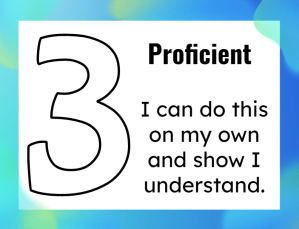
For those unfamiliar with standards-based grading, students receive a 1-4 for each standard taught during a quarter based off of their proficiency with each standard instead of a quarterly grade being determined by averaging a group of assignments on a 0-100 scale. Students might receive a 3 on two math standards and a 2 on another standard. This more focused approach shows the exact area of weakness, whereas a student could receive assignments of: 100, 75, 90, 50 and earn a C. Two of the assignments were an A so is it truly showing their academic ability when they had one assignment that they struggled on?

With standards-based grading the focus is on the learning and not the grade. Students understand that their goal is to show mastery of the standard by the end of the year, so if they don't understand something at first they still have time to show that mastery by the end of the school year.

It also means that if they don't understand something right away, instead of getting a 50% or lower on an assessment and then struggling to dig themselves out of that hole for the rest of the quarter, they can prove that they have mastered a standard and receive a 3 on it.

I find that I am not grading every little thing that we do together. At my previous county I was required to put in 2 grades per week for each content area. This is exhausting and completely puts the focus on the grade and not the content being learned.

So much of learning is doing things together. Why should I be required to grade something that we did as a class? I've taught my students to not worry about if something is graded, but instead just focus on learning how to complete the task at hand so that when something is truly graded they will be comfortable doing it.

The easiest way to organize standards-based grading is by having students create a portfolio of their learning throughout the year. In my classroom students have a binder with dividers for each content area where they keep their assessments and any other completed work that shows their mastery.

I've also created these signs for my classroom so that the students understand the meaning behind each level. It is a visual reminder that allows them to also rate themselves on each topic. They can read the descriptions and decide where they think they fall on a certain topic
I wish there was a way to continue this idea of standards-based grading throughout the rest of the grades 8-12 (unless it is already out there and I just haven't seen it yet). I remember being in middle and high school and there being so much pressure to get good grades that somethings I wasn't always focused on what I was actually learning.

Thanks for going on my standards-based grading rant with me! I hope that we can continue to shift from a focus on grades to a focus on learning.
Thursday, July 22, 2021

5th Grade I CAN Statements

It's about that time. I have hit that point in my summer break where I am ready to start looking ahead to next school year. I will say that it is hitting a little later this year than normal, which is absolutely needed after this past year.

I revamped these I CAN statements to use in my room in place of putting up the standards. I like the direct statement that the students can read and say, "I can" do this!

I tried to make them appealing to the eye by adding a visual of some sort to help them understand what is expected. I also used bold and underline formatting to help identify key words in the statement.

These are all mostly in black and white, because let's be honest, who has access to a color printer at their school (*rolls eyes*). However, I do like to use colorful paper to print them on and make them pop in the classroom.

Click on the images below to get your FREE copy!


Monday, February 8, 2021

Cafe Board and Interesting Word Collector

The second part of The Daily Five is the Cafe. This is a set of strategies that are broken into the four components of reading. (To learn more about them, check out www.thedailycafe.com/cafe)

For my Cafe board I decided to make strips that have the strategies listed on them and then once we have gone over one of the strategies we add it to the Cafe board.  Also, I use the mini-Post-It note pads and have one for each student and put their sticky note under the exact strategy they are working on rather than at the top of each column.

Here is the Cafe board in my classroom:


Here are my resources:
The Interesting Word Collector is as a word wall. Throughout the school year we will add words to this wall that we come across in reading or writing.

Here is the Interesting Word Collector in my classroom:


Instagram: @mrspotterstyle
Twitter: @apotter730


Monday, January 25, 2021

The Daily Five

I was first introduced to The Daily Five book by Gail Boushey and Joan Moser when I taught in Fairfax. I was a second year teacher in grade 3 at the time and was excited to try something new.

This blog post discusses what exactly The Daily Five is, how I set it up in my classroom, and the signs I used. I prefer to make the signs with my students each year, so you will notice they are nothing fancy.

So I decided to hit the ground running and jump right into the daily five the first week of school.  I explained to the students briefly all five parts of the daily five and then explained that we would be slowly learning about each one of the next 5 weeks.  I started off with teaching them about Read to Self. I followed the ideas in the book and had them read for only 3-5 minutes before stopping them to join me back on the carpet.  The first time I just released them to choose a spot wherever they wanted, but I discovered this didn't quite work out so well.  I had students under tables, behind doors, etc. So we then had to go over appropriate places to read in the room.  By the end of the week we made this chart:


Next we started Read to Someone.  The kids really enjoyed reading with each other.  The hard part about having them all do read to someone at the same time is that it was quite noisy in the room which bothered some kids, but I assured them that once we actually started the daily five there would only be a few pairs of students read aloud while the other students were working on other parts.  By the end of the second week we had made this chart:


Next we introduced Listen to Reading.  I only have 4 computers in my room that we can use as listening centers so I kept a list of the students and made sure that by the end of the week all 28 of them had gone on the computers to listen to books.  Our school has a subscription to MyON which is where we go to listen to books.  Before I introduced listen to reading I showed them the website and how to log on and choose books.  As the four students were listening to reading I allowed the other students to choose whether they wanted to practice read to self or read to someone.  I made sure that I was taking notes on the students behaviors, while monitoring the students on the computers to make sure they were not having any problems navigating the website.  I found this part of the daily five was the hardest to manage because it always seems that one of the computers has a hiccup and has to be rebooted.  Here is the chart we created by the end of the week:


Around the second or third week of school I introduced the students to a Writer's Notebook and Writer's Workshop (which I will talk about in a later post). I made sure to do this before introducing Work on Writing because I feel that it is important to teach the students how the writer's notebook works before giving them the choice to work in their notebook during work on writing.  During the fourth week of school I introduced work on writing by explaining to students that this was their time to work on a piece of writing that they have already started, begin a new piece of writing, edit a piece of writing, or publish a piece of writing.  We made this chart by the end of the week:


Lastly, we introduced Word Work.  I divide my word work into three choices. The students can work with the mystery word using the magnetic letters, they can do the word sort, or they can write the room.  I did a spelling inventory during this week so that I can help steer the students in the right direction when it comes to their word work choice.  I will explain my word work ideas in a later post.  Here is our chart:


All five of these charts are located on the wall in the back of the room so the students can see a visual to remind them of the five different parts of the daily five and what they should be doing during each part.


I truly miss teaching reading, but wanted to share my resources with you all!

Here are a few resources:

Instagram: @mrspotterstyle
Twitter: @apotter730


Monday, December 28, 2020

School Supply Labels

 I have used a version of these school supplies in my classroom, but wanted to recreate them based on the needs of the different teachers since some of us are teaching virtually, some are doing a hybrid setup, and some are back in the classroom full time.

This Google Slides presentation has school supply icons so that you can easily let students know which supplies are needed to complete an activity.

I have included 3 sets. The first set is the smaller icons that can easily be copy and pasted into a digital platform. This could be putting them at the top of an assignment, posting them in Google Classroom, or putting them on a slide that can be projected virtually or in a classroom.

The second set is the icon placed in a circle with the icon name. This is more ideal for the classroom. They can easily be printed on regular computer paper or card stock and laminated to be displayed in a classroom when students need materials for an activity.

The third set is similar to the second set, but it does not contain the circle or words, it is just a larger version of the icon that can be printed and cut out in the shape of the icon. I would print on card stock or computer paper and laminate for durability.

If you want to be able to edit this presentation to fit the needs of your classroom (ie. adjust sizes, change font, add different icons, etc.), then click on File, then Make a copy to get your own copy that you have editing rights to.

Click here to get your copy!

https://bit.ly/AmberPotterWebsite

Instagram: @mrspotterstyle

Twitter: @apotter730